> ## Documentation Index
> Fetch the complete documentation index at: https://docs.gotohuman.com/llms.txt
> Use this file to discover all available pages before exploring further.
# n8n
Use our **verified [n8n](https://n8n.io/) node** to add human review and approval steps to your n8n AI agents and workflows.
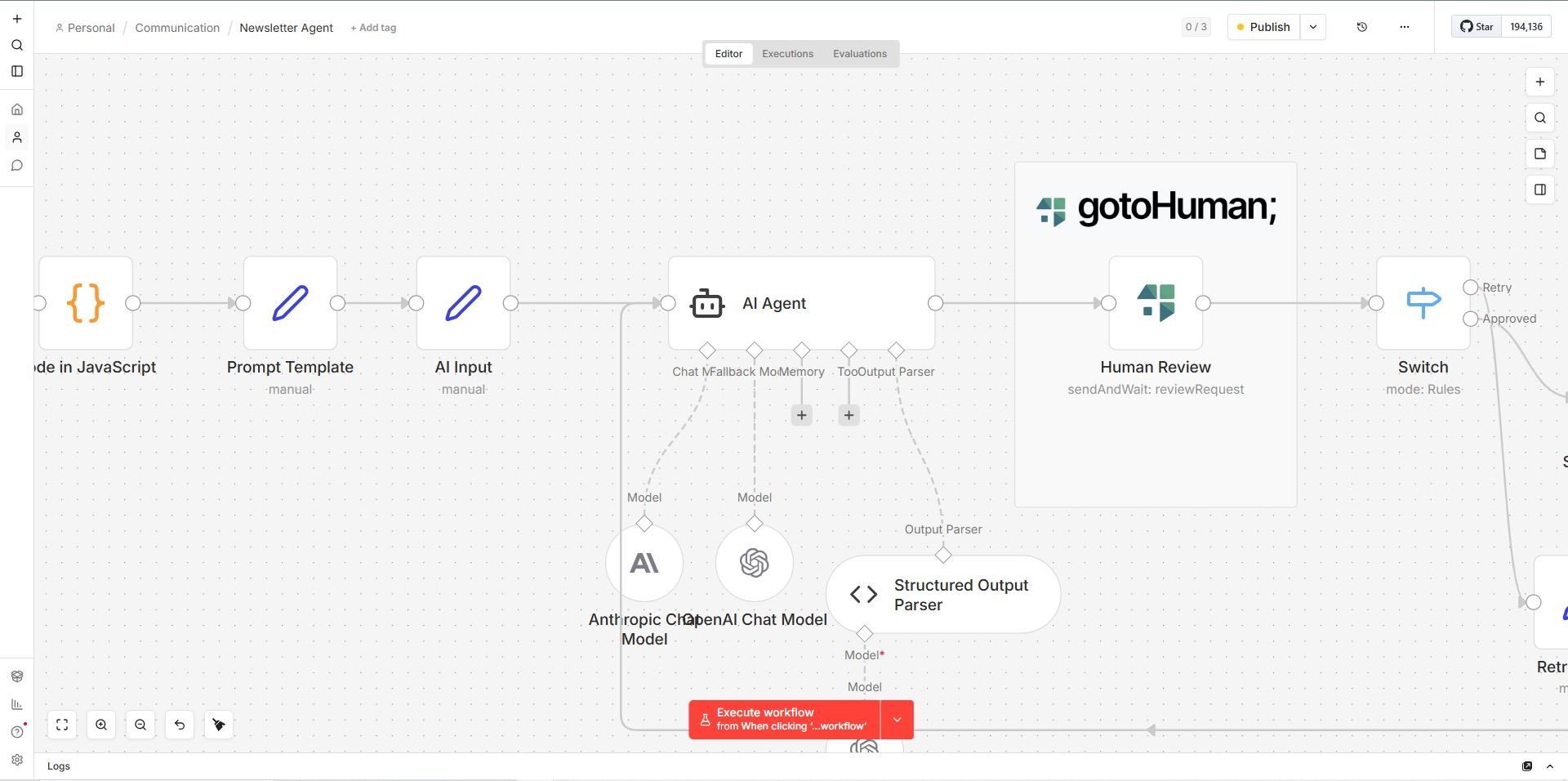 A great way to get started is to check out one of [our n8n workflow templates](https://n8n.io/creators/gotohuman/).
## Prerequisites
* A gotoHuman account and **API key** for the node credentials ([sign up](https://app.gotohuman.com/))
* A [tool review](/create-template) with the fields you want reviewers to see or fill in
* An [agent](/agent-setup) to select in the node (identifies which agent the review belongs to)
## Install the node
Our **verified community node** is approved by n8n and available for n8n cloud and self-hosted n8n instances.
### From the nodes panel (n8n cloud + self-hosted)
Simply search for **gotoHuman** in the nodes panel and install it.
A great way to get started is to check out one of [our n8n workflow templates](https://n8n.io/creators/gotohuman/).
## Prerequisites
* A gotoHuman account and **API key** for the node credentials ([sign up](https://app.gotohuman.com/))
* A [tool review](/create-template) with the fields you want reviewers to see or fill in
* An [agent](/agent-setup) to select in the node (identifies which agent the review belongs to)
## Install the node
Our **verified community node** is approved by n8n and available for n8n cloud and self-hosted n8n instances.
### From the nodes panel (n8n cloud + self-hosted)
Simply search for **gotoHuman** in the nodes panel and install it.
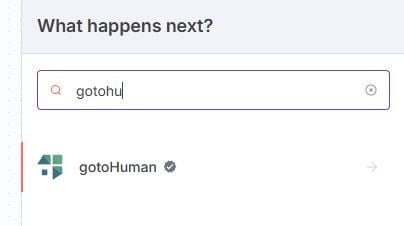 If you can't find the node in the nodes panel, you may need to update your n8n version. If you're self-hosting, you can also install the node manually from npm as described below. Make sure that installing verified community nodes is not disabled by your instance owner. More in the [n8n docs](https://docs.n8n.io/integrations/community-nodes/installation/).
### From npm (self-hosted)
If you run a self-hosted n8n instance, install the node from npm.
Our [npm package name](https://www.npmjs.com/package/@gotohuman/n8n-nodes-gotohuman) is
```
@gotohuman/n8n-nodes-gotohuman
```
More info on installing community nodes in the [n8n docs](https://docs.n8n.io/integrations/community-nodes/installation/).
## Actions and triggers
Search for **gotoHuman** in the nodes panel to see all available actions and triggers.
### Actions
**Review Request**
| Operation | Description |
| ------------------------------ | --------------------------------------------------------------------------------------------------------------------------------------------------------------------------------------------------------------------------------------------------------------------------------------------------- |
| **Send and Wait for Response** | Send a review request and pause the workflow. The workflow resumes automatically with the review result once the reviewer submits. No agent webhook setup needed — a dynamic webhook URL is already included in the request. |
| **Send** | Send a review request without waiting. Handle the response via the **On message or review/tool result for agent** trigger on your [agent webhook](/agent-setup#agent-webhook). Optionally, use the **Completed Review** trigger if you have a [tool webhook](/create-template#tool-webhook) set up. |
| **Delete** | Delete an existing review request by its review ID. |
**Message**
| Operation | Description |
| ------------------------- | ------------------------------------------------------------- |
| **Send Message to Human** | Send a chat message to a human for a given agent and session. |
### Triggers
| Trigger | Description |
| ---------------------------------------------- | --------------------------------------------------------------------------------------------------------------------------------------------------------------------------------------------------------------------------------------------------------------------- |
| **Completed Review** | A reviewer approved a review. If you have a [tool webhook](/create-template#tool-webhook) set up, use this trigger to execute the tool in response to the approval. |
| **On message or review/tool result for agent** | Fires on your [agent webhook](/agent-setup#agent-webhook) for any review completion — and also includes the `toolResult` if a [tool webhook](/create-template#tool-webhook) was called. Also fires for [chat agent](/chat-agents) messages (`session.human_message`). |
| **Submitted Agent Trigger Form** | A user submitted a [trigger form](/manual-triggers) for your agent. Output contains the submitted form data. |
## Review Request fields
These fields are available when using the **Send** or **Send and Wait for Response** operations.
| Field | Description |
| ------------------ | -------------------------------------------------------------------------------------------------------------------------- |
| **Agent** | The [gotoHuman agent](/agent-setup) this review belongs to. Choose from the list or enter an ID. |
| **Tool review** | The [tool review](/create-template) to use. |
| **Review Data** | JSON object with the field values to populate the review. Any property can be freely mapped to a field in the tool review. |
| **Review Config** | Optional JSON to dynamically configure the review and its fields at request time. |
| **Session ID** | Links this review to an ongoing agent session or workflow run. |
| **Assigned Users** | Restrict the review to specific users by email. Defaults to all users or the user who triggered the session. |
| **Title** | Set the review title shown in the inbox and notifications. |
| **Auto Approve** | Set to `true` to automatically approve the request — useful for monitoring runs without requiring human action. |
## Review request as an agent tool
You can attach the **Review Request** action as a tool on an n8n AI Agent node. For a conversational setup — where the agent talks to a user in a gotoHuman [chat session](/chat-agents) and can request human review along the way — combine three pieces:
1. **On message or review/tool result for agent** trigger — starts (or resumes) your workflow when a user sends a message or a review result arrives. Pass the `sessionId` from the trigger payload into subsequent actions.
2. **Review Request** (as agent tool) — the agent calls this to request human approval. Use the same **Agent** and pass the `sessionId` to link the review to the conversation.
3. **Send Message to Human** — lets the agent post replies back into the chat session. Pass the same `sessionId`.
Without the trigger and **Send Message to Human**, the review action alone cannot maintain a back-and-forth session with the user in gotoHuman.
## Handle review responses
How you receive the review result depends on which operation and trigger you use.
#### Send and Wait for Response
No webhook setup needed. The workflow pauses at the node and resumes automatically once the reviewer submits. The review result is available as the node's output — connect it directly to your next step.
#### Completed Review trigger (tool webhook)
If your tool review has a [tool webhook](/create-template#tool-webhook) configured, gotoHuman calls that URL when a review is approved. Use the **Completed Review** trigger as that endpoint. This is the right pattern when you want to execute a tool or call an external system in response to an approval.
#### On message or review/tool result for agent trigger (agent webhook)
All review completions are also delivered to your [agent webhook](/agent-setup#agent-webhook). If a tool webhook was called and returned a response, it is included as `toolResult` in the payload. Use the **On message or review/tool result for agent** trigger to handle these in your workflow.
This trigger also fires for [chat messages](/chat-agents) (`session.human_message`), making it the single entry point for agent-driven workflows that combine chat and reviews.
See the full [webhook event structure](/webhooks).
#### Built-in Webhook node
If you need to **return data** from your workflow back to gotoHuman as the tool webhook response — so it gets passed along to the agent webhook as `toolResult` — use n8n's built-in **Webhook** node combined with the **Respond to Webhook** node. Set your Webhook node's URL as the tool webhook URL in gotoHuman. When a review is approved, gotoHuman calls that URL, your workflow runs, and the Respond to Webhook node returns the result. gotoHuman then forwards that result to your agent webhook as `toolResult`.
## Multiple items input
Just like other Human-in-the-Loop / sendAndWait nodes in n8n, passing multiple items as input won't work correctly — the node would only resume once for the first response. This is due to n8n's limitation that it does not allow splitting items into separate parallel execution paths.
If multiple items flow in parallel, you have these options:
#### Split workflows
Create a separate workflow that starts with a **When executed by another workflow** trigger node (choose "Accept all data"), followed by the gotoHuman node and the rest of your flow. Your original workflow ends with an **Execute Workflow** node (select the target workflow and choose "Run once for each item").
#### Loop over items
If processing reviews sequentially is acceptable, use a **Loop over Items** node. Start the loop before the gotoHuman node, include all nodes after it, and connect the final node back to the loop input.
#### Webhook + Review Request (Send)
To avoid sequential processing without creating a separate workflow, use a **Webhook** node to fan out into separate execution paths on the same canvas. Each path uses the **Review Request** action with **Send** (not Send and Wait for Response) to submit the review, then handles the response via the **On message or review/tool result for agent** trigger or **Completed Review** trigger.
If you can't find the node in the nodes panel, you may need to update your n8n version. If you're self-hosting, you can also install the node manually from npm as described below. Make sure that installing verified community nodes is not disabled by your instance owner. More in the [n8n docs](https://docs.n8n.io/integrations/community-nodes/installation/).
### From npm (self-hosted)
If you run a self-hosted n8n instance, install the node from npm.
Our [npm package name](https://www.npmjs.com/package/@gotohuman/n8n-nodes-gotohuman) is
```
@gotohuman/n8n-nodes-gotohuman
```
More info on installing community nodes in the [n8n docs](https://docs.n8n.io/integrations/community-nodes/installation/).
## Actions and triggers
Search for **gotoHuman** in the nodes panel to see all available actions and triggers.
### Actions
**Review Request**
| Operation | Description |
| ------------------------------ | --------------------------------------------------------------------------------------------------------------------------------------------------------------------------------------------------------------------------------------------------------------------------------------------------- |
| **Send and Wait for Response** | Send a review request and pause the workflow. The workflow resumes automatically with the review result once the reviewer submits. No agent webhook setup needed — a dynamic webhook URL is already included in the request. |
| **Send** | Send a review request without waiting. Handle the response via the **On message or review/tool result for agent** trigger on your [agent webhook](/agent-setup#agent-webhook). Optionally, use the **Completed Review** trigger if you have a [tool webhook](/create-template#tool-webhook) set up. |
| **Delete** | Delete an existing review request by its review ID. |
**Message**
| Operation | Description |
| ------------------------- | ------------------------------------------------------------- |
| **Send Message to Human** | Send a chat message to a human for a given agent and session. |
### Triggers
| Trigger | Description |
| ---------------------------------------------- | --------------------------------------------------------------------------------------------------------------------------------------------------------------------------------------------------------------------------------------------------------------------- |
| **Completed Review** | A reviewer approved a review. If you have a [tool webhook](/create-template#tool-webhook) set up, use this trigger to execute the tool in response to the approval. |
| **On message or review/tool result for agent** | Fires on your [agent webhook](/agent-setup#agent-webhook) for any review completion — and also includes the `toolResult` if a [tool webhook](/create-template#tool-webhook) was called. Also fires for [chat agent](/chat-agents) messages (`session.human_message`). |
| **Submitted Agent Trigger Form** | A user submitted a [trigger form](/manual-triggers) for your agent. Output contains the submitted form data. |
## Review Request fields
These fields are available when using the **Send** or **Send and Wait for Response** operations.
| Field | Description |
| ------------------ | -------------------------------------------------------------------------------------------------------------------------- |
| **Agent** | The [gotoHuman agent](/agent-setup) this review belongs to. Choose from the list or enter an ID. |
| **Tool review** | The [tool review](/create-template) to use. |
| **Review Data** | JSON object with the field values to populate the review. Any property can be freely mapped to a field in the tool review. |
| **Review Config** | Optional JSON to dynamically configure the review and its fields at request time. |
| **Session ID** | Links this review to an ongoing agent session or workflow run. |
| **Assigned Users** | Restrict the review to specific users by email. Defaults to all users or the user who triggered the session. |
| **Title** | Set the review title shown in the inbox and notifications. |
| **Auto Approve** | Set to `true` to automatically approve the request — useful for monitoring runs without requiring human action. |
## Review request as an agent tool
You can attach the **Review Request** action as a tool on an n8n AI Agent node. For a conversational setup — where the agent talks to a user in a gotoHuman [chat session](/chat-agents) and can request human review along the way — combine three pieces:
1. **On message or review/tool result for agent** trigger — starts (or resumes) your workflow when a user sends a message or a review result arrives. Pass the `sessionId` from the trigger payload into subsequent actions.
2. **Review Request** (as agent tool) — the agent calls this to request human approval. Use the same **Agent** and pass the `sessionId` to link the review to the conversation.
3. **Send Message to Human** — lets the agent post replies back into the chat session. Pass the same `sessionId`.
Without the trigger and **Send Message to Human**, the review action alone cannot maintain a back-and-forth session with the user in gotoHuman.
## Handle review responses
How you receive the review result depends on which operation and trigger you use.
#### Send and Wait for Response
No webhook setup needed. The workflow pauses at the node and resumes automatically once the reviewer submits. The review result is available as the node's output — connect it directly to your next step.
#### Completed Review trigger (tool webhook)
If your tool review has a [tool webhook](/create-template#tool-webhook) configured, gotoHuman calls that URL when a review is approved. Use the **Completed Review** trigger as that endpoint. This is the right pattern when you want to execute a tool or call an external system in response to an approval.
#### On message or review/tool result for agent trigger (agent webhook)
All review completions are also delivered to your [agent webhook](/agent-setup#agent-webhook). If a tool webhook was called and returned a response, it is included as `toolResult` in the payload. Use the **On message or review/tool result for agent** trigger to handle these in your workflow.
This trigger also fires for [chat messages](/chat-agents) (`session.human_message`), making it the single entry point for agent-driven workflows that combine chat and reviews.
See the full [webhook event structure](/webhooks).
#### Built-in Webhook node
If you need to **return data** from your workflow back to gotoHuman as the tool webhook response — so it gets passed along to the agent webhook as `toolResult` — use n8n's built-in **Webhook** node combined with the **Respond to Webhook** node. Set your Webhook node's URL as the tool webhook URL in gotoHuman. When a review is approved, gotoHuman calls that URL, your workflow runs, and the Respond to Webhook node returns the result. gotoHuman then forwards that result to your agent webhook as `toolResult`.
## Multiple items input
Just like other Human-in-the-Loop / sendAndWait nodes in n8n, passing multiple items as input won't work correctly — the node would only resume once for the first response. This is due to n8n's limitation that it does not allow splitting items into separate parallel execution paths.
If multiple items flow in parallel, you have these options:
#### Split workflows
Create a separate workflow that starts with a **When executed by another workflow** trigger node (choose "Accept all data"), followed by the gotoHuman node and the rest of your flow. Your original workflow ends with an **Execute Workflow** node (select the target workflow and choose "Run once for each item").
#### Loop over items
If processing reviews sequentially is acceptable, use a **Loop over Items** node. Start the loop before the gotoHuman node, include all nodes after it, and connect the final node back to the loop input.
#### Webhook + Review Request (Send)
To avoid sequential processing without creating a separate workflow, use a **Webhook** node to fan out into separate execution paths on the same canvas. Each path uses the **Review Request** action with **Send** (not Send and Wait for Response) to submit the review, then handles the response via the **On message or review/tool result for agent** trigger or **Completed Review** trigger.