> ## Documentation Index
> Fetch the complete documentation index at: https://docs.gotohuman.com/llms.txt
> Use this file to discover all available pages before exploring further.
# Request a review
> Use our SDK or API to send requests for human review to gotoHuman. Make sure you have created your customized review template in gotoHuman first.
## Prepare
In your n8n workflow, add our verified gotoHuman community node.
Read more in our [n8n integration guide](/Integrations/n8n).
In your Make scenario, add a new module, search for `gotoHuman` and select our `Create a Review Request` module.
When setting up a connection, enter your gotoHuman **API key**.
Read more in our [Make integration guide](/Integrations/make-com).
Install our SDK:
```
pip install gotohuman
```
Setup an environment variable with your gotoHuman API key:
```
GOTOHUMAN_API_KEY=YOUR_API_KEY
```
If you're using a `.env` file, don't forget to load it:
```python theme={null}
from dotenv import load_dotenv
load_dotenv()
```
Initialize the SDK:
```python theme={null}
gotoHuman = GotoHuman()
```
Install our SDK:
```
npm i gotohuman
```
Initialize the SDK:
```javascript theme={null}
const gotoHuman = new GotoHuman(GOTOHUMAN_API_KEY)
```
Find your API key in gotoHuman.
Send requests for review with `POST` requests to our API at `https://api.gotohuman.com/requestReview`.
Include an `x-api-key` header with your gotoHuman API key.
## Send request
Select the review template you created in gotoHuman.
It will automatically load the fields you added to your review template and allow you to enter or map values to them.
Read more in our [n8n integration guide](/Integrations/n8n).
Select the review template you created in gotoHuman.
It will automatically load the fields you added to your review template and allow you to enter or map values to them.
Read more in our [Make integration guide](/Integrations/make-com).
Create a request with the ID of the form/review template you created. Pass the field values as shown in the review template editor (click "API Request") and optionally add some meta data.
```python theme={null}
review = gotoHuman.create_review("YOUR_FORM_ID")
review.add_field_data("exampleField1", value1)
review.add_field_data("exampleField2", value2)
review.add_meta_data("threadId", threadId)
review.assign_to_users(["[email protected]"])
try:
response = review.send_request()
print("Review sent successfully:", response)
except Exception as e:
print("An error occurred:", e)
```
Create a request with the ID of the form/review template you created. Pass the field values as shown in the review template editor (click "API Request") and optionally some meta data.
```javascript theme={null}
const reviewRequest = gotoHuman.createReview(GOTOHUMAN_FORM_ID)
.addFieldData("exampleField1", value1)
.addFieldData("exampleField2", value2)
.addMetaData("threadId", threadId)
.assignToUsers(["[email protected]"])
await reviewRequest.sendRequest()
```
Here is the structure of the API request. Pass the ID of the form/review template you created. Pass the field values as shown in the review template editor (click "API Request") and optionally some meta data.
```json theme={null}
{
"formId": "abcdef12345",
"fields": {
...
},
"meta": {
...
},
"assignTo": ["[email protected]"]
}
```
### Request attributes
#### `formId`
The `formId` is the ID of your review template. You can find it in the template details and the example request.
#### `fields`
When creating your form/review template in [our web app](https://app.gotohuman.com), you add different components to show dynamic content or collect user input. These added components determine the payload that you need to send with your request. You can find the expected format in the example request shown for your created review template (click "API Request").
Fields that you don't send any value for will be hidden.
This is handy for optional fields, but also if you need a varying number of a type of field, e.g. 1-n text fields. Then add n fields and just send values for the ones needed during this run.
For text-based fields you might in some cases not have a value for a field, but still want it to be shown to allow user input. To do that, simply send an empty string.
#### `title`
Set a custom title for the review request. This title is displayed in the [Agent Inbox](/web-ui#agent-inbox) and in [notification emails](/email-notifications) and [Slack messages](/slack), making it easier for reviewers to identify pending reviews.
This overrides any title configured in the [review template field settings](/create-template#review-title).
The title can also be set as a metadata property `_gthTitle` when using integrations like n8n.
#### `meta`
Add additional data to your request that you will receive back in the webhook. [Read more below](#add-additional-meta-data).
#### `assignTo`
Assign reviewers from your organization. [Read more below](#assign-reviewers).
#### `updateForReviewId`
When [allowing reviewers to request a retry (AI Retries / Prompt Edits)](/retries), you can update the review by referencing its' ID.
#### `webhookUrl`
In most cases you'll enter a static webhook URL for your agent. But in some cases you might want to pass along a dynamic webhook URL with each request using this attribute (This is what the send-and-wait node of our [n8n integration](/Integrations/n8n) does under the hood).
#### `autoApprove`
Set to `true` to automatically approve the review request. This is useful to keep monitoring even autonomously acting agents in gotoHuman and to easily switch back to human reviews at any time (think agent, prompt, or model updates).
This can also be set at the template level or via the metadata property `_gthAutoApprove`.
### Example request
Given that a urlLink (id: `linkedin`) and a text component (id: `aiDraft`) was added to a review template with ID "abcdef12345", a request might look like this:
Our n8n node will automatically show you the necessary inputs according to your review template.
Read more in our [n8n integration guide](/Integrations/n8n).
Our Make module will automatically show you the necessary inputs according to your review template.
Read more in our [Make integration guide](/Integrations/make-com).
```python theme={null}
review = gotoHuman.create_review("abcdef12345")
review.add_field_data("linkedin", {
"label": "Rodrigo G.",
"url": "https://www.linkedin.com/in/rodrigog12/"
})
review.add_field_data("aiDraft", "Hey there, I saw...")
try:
response = review.send_request()
print("Review sent successfully:", response)
except Exception as e:
print("An error occurred:", e)
```
```javascript theme={null}
const reviewRequest = gotoHuman.createReview("abcdef12345")
.addFieldData("linkedin", {
label: "Rodrigo G.",
url: "https://www.linkedin.com/in/rodrigog12/"
})
.addFieldData("aiDraft", "Hey there, I saw...")
await reviewRequest.sendRequest()
```
```json theme={null}
{
"formId": "abcdef12345",
"fields": {
"linkedin": {
"label": "Rodrigo G.",
"url": "https://www.linkedin.com/in/rodrigog12/"
},
"aiDraft": "Hey there, I saw..."
}
}
```
### Images / Videos
For images and videos—including CDN storage, URLs, base64, file uploads, and image editing—see [Images and videos](/images-videos).
### Add additional meta data
When a user is done reviewing and submits the form, you will receive a webhook. For convenience, you can add additional data to your request that you will receive back in the webhook. This could be an ID of your workflow run or of a conversation thread. It could look like this:
When using our sendAndWait n8n node, you shouldn't need to add meta data as you will still have access to data from previous nodes in the same workflow run.
Our module shows a dedicated `Meta Data` field to add key-value pairs.
Read more in our [Make integration guide](/Integrations/make-com).
```python theme={null}
review = gotoHuman.create_review("abcdef12345")
review.add_field_data(...)
review.add_meta_data('threadId', 'oai-thread-443289')
try:
response = review.send_request()
print("Review sent successfully:", response)
except Exception as e:
print("An error occurred:", e)
```
```javascript theme={null}
const reviewRequest = gotoHuman.createReview("abcdef12345")
.addFieldData(...)
.addMetaData("threadId", "oai-thread-443289")
await reviewRequest.sendRequest()
```
```json theme={null}
{
"formId": "abcdef12345",
"fields": {
...
},
"meta": {
"threadId": "oai-thread-443289"
}
}
```
### Assign reviewers
To send a review request only to selected users of your team, add a list of email addresses of those users. Use the email address used when signing up for gotoHuman.
You can also [assign reviewers at the template level](/create-template#assign-to-specific-reviewers) for all requests from that template. Note that any request-level assignment will take precedence over the template assignment.
Our n8n node shows a field `Assigned Users`. Select `All Users` or alternatively `Only selected users` and map or enter their email addresses.
Read more in our [n8n integration guide](/Integrations/n8n).
Our module shows a field `Assigned Users`. Select `All Users` or alternatively `Only selected users` and map or enter their email addresses.
Read more in our [Make integration guide](/Integrations/make-com).
```python theme={null}
review = gotoHuman.create_review("abcdef12345")
review.add_field_data(...)
review.assign_to_users(["[email protected]"])
try:
response = review.send_request()
print("Review sent successfully:", response)
except Exception as e:
print("An error occurred:", e)
```
```javascript theme={null}
const reviewRequest = gotoHuman.createReview("abcdef12345")
.addFieldData(...)
.assignToUsers(["[email protected]"])
await reviewRequest.sendRequest()
```
```json theme={null}
{
"formId": "abcdef12345",
"fields": {
...
},
"assignTo": ["[email protected]"]
}
```
### Selectable options & default values
When using **Buttons**, **Checkboxes**, or **Dropdowns** in your review templates, you can either define a fixed set of selectable options or send dynamic options with each request. Either way, you can also set default values that will be preselected.
Read our [n8n integration guide](/Integrations/n8n#enter-values) about how to send dynamic options and defaults.
For any of the mentioned field types you will see a field `Options to show` to optionally enter the selectable options and a field `Preselected Options` to enter any preselected option(s).
```python theme={null}
review.add_field_data("buttons", {
"options": [
{
"id": "choice1",
"label": "Choice 1"
},
{
"id": "choice2",
"label": "Choice 2"
}
],
"default": "choice2"
})
```
```javascript theme={null}
review.addFieldData("buttons", {
"options": [
{
"id": "choice1",
"label": "Choice 1"
},
{
"id": "choice2",
"label": "Choice 2"
}
],
"default": "choice2"
})
```
```json theme={null}
{
"fields": {
"buttons": {
"options": [
{
"id": "choice1",
"label": "Choice 1"
},
{
"id": "choice2",
"label": "Choice 2"
}
],
"default": "choice2"
}
}
}
```
### Workflow metadata
If your workflow includes [manual triggers](/manual-triggers) and/or multiple review steps, you can send workflow metadata, so we can provide reviewers with an overview and navigation for each run of the workflow.
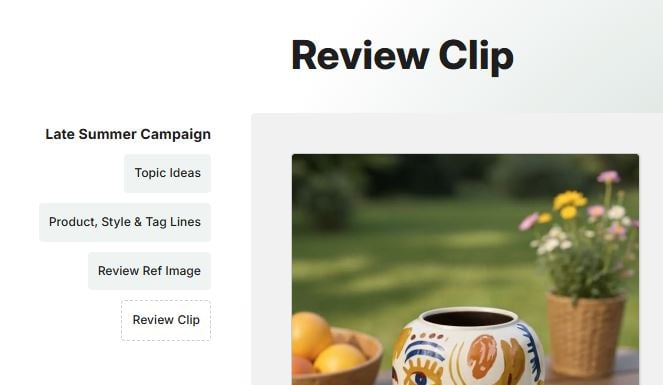 In the **Meta Data** field, enter JSON with a field `_gthWorkflow` holding the workflow information:
```json theme={null}
{
"_gthWorkflow": {
"runId": "1234567890",
"runName": "My Workflow",
"prevSteps": [
"1234567890"
]
}
}
```
In the **Meta Data** field, add a key `_gthWorkflow` and enter JSON with the workflow information:
```json theme={null}
{
"_gthWorkflow": {
"runId": "1234567890",
"runName": "My Workflow",
"prevSteps": [
"1234567890"
]
}
}
```
```python theme={null}
review.add_meta_data("_gthWorkflow", {
"runId": "1234567890",
"runName": "My Workflow",
"prevSteps": [
"1234567890"
]
})
```
```javascript theme={null}
reviewRequest.addMetaData("_gthWorkflow", {
"runId": "1234567890",
"runName": "My Workflow",
"prevSteps": [
"1234567890"
]
})
```
```json theme={null}
{
"meta": {
"_gthWorkflow": {
"runId": "1234567890",
"runName": "My Workflow",
"prevSteps": [
"1234567890"
]
}
}
}
```
* `runId` is a unique identifier for the current run of the workflow. You need to incl. the same `runId` in each review request of the same run to link them together. If you incl. a workflow object but no `runId` (even `{}`), and also for [manual triggers](/manual-triggers), we'll create a new runId for you and return it in the review response as `workflowRunId` so you can reference it in your subsequent review requests.
* `runName` is an optional name identifying the current run of the workflow (for display purposes). You can set or overwrite it in any of your review requests during a run.
* `prevSteps` is an array of reviewIds of any previous gotoHuman review step(s) (omit for first step). We need this to know how the steps are linked together.
## Response
Our API responds with a `200 OK` incl. a link to the pending review:
```json theme={null}
{
"reviewId": "iVcn4fvRpPhAdVnZ7v0d",
"gthLink": "https://app.gotohuman.com/accounts/Kb6A8ZqIaJkueTA76vv5/inbox/agents/all/reviews/iVcn4fvRpPhAdVnZ7v0d",
"extReviewerLinks": [
{
"email": "[email protected]",
"link": "https://app.gotohuman.com/..."
}
]
}
```
The `extReviewerLinks` property is included when [external reviewers](/web-ui#external-reviewers) have been added/assigned to the review request.
In the **Meta Data** field, enter JSON with a field `_gthWorkflow` holding the workflow information:
```json theme={null}
{
"_gthWorkflow": {
"runId": "1234567890",
"runName": "My Workflow",
"prevSteps": [
"1234567890"
]
}
}
```
In the **Meta Data** field, add a key `_gthWorkflow` and enter JSON with the workflow information:
```json theme={null}
{
"_gthWorkflow": {
"runId": "1234567890",
"runName": "My Workflow",
"prevSteps": [
"1234567890"
]
}
}
```
```python theme={null}
review.add_meta_data("_gthWorkflow", {
"runId": "1234567890",
"runName": "My Workflow",
"prevSteps": [
"1234567890"
]
})
```
```javascript theme={null}
reviewRequest.addMetaData("_gthWorkflow", {
"runId": "1234567890",
"runName": "My Workflow",
"prevSteps": [
"1234567890"
]
})
```
```json theme={null}
{
"meta": {
"_gthWorkflow": {
"runId": "1234567890",
"runName": "My Workflow",
"prevSteps": [
"1234567890"
]
}
}
}
```
* `runId` is a unique identifier for the current run of the workflow. You need to incl. the same `runId` in each review request of the same run to link them together. If you incl. a workflow object but no `runId` (even `{}`), and also for [manual triggers](/manual-triggers), we'll create a new runId for you and return it in the review response as `workflowRunId` so you can reference it in your subsequent review requests.
* `runName` is an optional name identifying the current run of the workflow (for display purposes). You can set or overwrite it in any of your review requests during a run.
* `prevSteps` is an array of reviewIds of any previous gotoHuman review step(s) (omit for first step). We need this to know how the steps are linked together.
## Response
Our API responds with a `200 OK` incl. a link to the pending review:
```json theme={null}
{
"reviewId": "iVcn4fvRpPhAdVnZ7v0d",
"gthLink": "https://app.gotohuman.com/accounts/Kb6A8ZqIaJkueTA76vv5/inbox/agents/all/reviews/iVcn4fvRpPhAdVnZ7v0d",
"extReviewerLinks": [
{
"email": "[email protected]",
"link": "https://app.gotohuman.com/..."
}
]
}
```
The `extReviewerLinks` property is included when [external reviewers](/web-ui#external-reviewers) have been added/assigned to the review request.